
0
 You might have observed Facebook like box in every blog and in every website. Facebook like box is used in all websites and blogs because it mainly helps you in driving free traffic from Facebook as it is the largest social networking site. It helps you in establishing your brand and promoting it for free. You might have observed in your Facebook like box below there will be a link pointing to Facebook developers site. It looks like you are promoting your brand with Facebook brand by giving a link back to them. But fortunately I got a new way of removing 'Facebook social plugin' link by editing like box code.
If you own a self-hosted WordPress blog I recently mentioned in one of posts how to drive traffic to your WordPress blog from Facebook by creating a Facebook application. By default you will get an iframe code from Facebook and paste it in your HTML or HTML gadget to start displaying Facebook like box in your blog. If you own a blog in blogger copy and paste the below code in HTML/JavaScript box. If you own a WordPress blog or website just paste the following sort of code anywhere in your HTML.
Related posts on topic:
Bloggers discussion forums on Facebook
How to make your Facebook Timeline complete private
How to be online for only close friends in Facebook
Steps to remove Facebook social plugin link from Facebook like box:
1. Copy and Paste the below code in your HTML.
2. Code
3. In blogger after pasting the code click in HTML/JavaScript box click on save button. In WordPress you can save this HTML code wherever you wish it to appear in your template.
4. This is the final look of widget how it looks in your blog. In the image you can clearly see that Facebook social plugin link from Facebook like box has been completely removed.

 Read More
How to remove Facebook social plugin link from Facebook like box
You might have observed Facebook like box in every blog and in every website. Facebook like box is used in all websites and blogs because it mainly helps you in driving free traffic from Facebook as it is the largest social networking site. It helps you in establishing your brand and promoting it for free. You might have observed in your Facebook like box below there will be a link pointing to Facebook developers site. It looks like you are promoting your brand with Facebook brand by giving a link back to them. But fortunately I got a new way of removing 'Facebook social plugin' link by editing like box code.If you own a self-hosted WordPress blog I recently mentioned in one of posts how to drive traffic to your WordPress blog from Facebook by creating a Facebook application. By default you will get an iframe code from Facebook and paste it in your HTML or HTML gadget to start displaying Facebook like box in your blog. If you own a blog in blogger copy and paste the below code in HTML/JavaScript box. If you own a WordPress blog or website just paste the following sort of code anywhere in your HTML.
Related posts on topic:
Bloggers discussion forums on Facebook
How to make your Facebook Timeline complete private
How to be online for only close friends in Facebook
Steps to remove Facebook social plugin link from Facebook like box:
1. Copy and Paste the below code in your HTML.
2. Code
<style type="text/css">
.crazyinternet {
width: 280px;
height: 150px;
border-radius: 3px;
position: relative;
background-color:#FFFFFF;
padding:5px 10px 15px 0
}
.crazyinternet, .crazyinternet:before, .crazyinternet:after {
background: #FFFFFF;
border: 1px solid #F5F5F5;
}
.crazyinternet:before, .crazyinternet:after {
content: "";
position: absolute;
bottom: -3px;
left: 2px;
right: 2px;
height: 1px;
border-top: none;
}
.crazyinternet:after {
left: 4px;
right: 4px;
bottom: -5px;
box-shadow: 0 0 2px #F5F5F5;
}
</style>
<div class="crazyinternet">
<div style="height:160px;overflow:hidden">
<fb:like-box href="http://www.facebook.com/FreeMobiApps" data-width=300 data-height=189 data-show-faces=true data-border-color="#FFFFFF" data-stream=false data-header=false></fb:like-box>
</div>
</div>
<div id="fb-root"></div>
<script>(function(d, s, id) {
var js, fjs = d.getElementsByTagName(s)[0];
if (d.getElementById(id)) return;
js = d.createElement(s); js.id = id;
js.src = "//connect.facebook.net/en_US/all.js#xfbml=1";
fjs.parentNode.insertBefore(js, fjs);
}(document, 'script', 'facebook-jssdk'));
</script>
.crazyinternet {
width: 280px;
height: 150px;
border-radius: 3px;
position: relative;
background-color:#FFFFFF;
padding:5px 10px 15px 0
}
.crazyinternet, .crazyinternet:before, .crazyinternet:after {
background: #FFFFFF;
border: 1px solid #F5F5F5;
}
.crazyinternet:before, .crazyinternet:after {
content: "";
position: absolute;
bottom: -3px;
left: 2px;
right: 2px;
height: 1px;
border-top: none;
}
.crazyinternet:after {
left: 4px;
right: 4px;
bottom: -5px;
box-shadow: 0 0 2px #F5F5F5;
}
</style>
<div class="crazyinternet">
<div style="height:160px;overflow:hidden">
<fb:like-box href="http://www.facebook.com/FreeMobiApps" data-width=300 data-height=189 data-show-faces=true data-border-color="#FFFFFF" data-stream=false data-header=false></fb:like-box>
</div>
</div>
<div id="fb-root"></div>
<script>(function(d, s, id) {
var js, fjs = d.getElementsByTagName(s)[0];
if (d.getElementById(id)) return;
js = d.createElement(s); js.id = id;
js.src = "//connect.facebook.net/en_US/all.js#xfbml=1";
fjs.parentNode.insertBefore(js, fjs);
}(document, 'script', 'facebook-jssdk'));
</script>
3. In blogger after pasting the code click in HTML/JavaScript box click on save button. In WordPress you can save this HTML code wherever you wish it to appear in your template.
Tips for unique customization:
1. Change your Facebook fan page username which is highlighted in blue color that is mine with yours. I mean to say replace my fan page username 'FreeMobiApps' with your Facebook fan page username.
2. To change the background color of the like box you can edit #FFFFFF with your desired CSS color code.
3. You can also customize the height and width of the widget by changing the 'PX' to your necessity.
You can tell us if you find any bugs in the code. Be safe and secure and escape from Facebook tracking you. Happy browsing.
Read More
0
Read More
Facebook launched timeline on mobile
Thanks again to Govind Choudhary from whose Blog I came to know of this information....
Please visit his blog too...Its an amazing blog...
A timeline is a way of displaying a list of events in chronological order. It is typically a graphic design showing a long bar labeled with dates alongside itself and events labeled on points where they would have happened.It highlights all your Life story in a Single page from beginning when you joined facebook...Read more of it at FACEBOOK TIMELINE
 Facebook launched Timeline on Android Phone and m.facebook.com using Touch devices to make it fully Available on Web.Mobile timeline starts with your unique cover photo. As you scroll down, you’ll see your posts, photos and life events as they happened. Photo albums and other posts are horizontally swappable. You can also swipe through the views at the top of your timeline to navigate to your map, photos, subscribers and more.
Please visit his blog too...Its an amazing blog...
A timeline is a way of displaying a list of events in chronological order. It is typically a graphic design showing a long bar labeled with dates alongside itself and events labeled on points where they would have happened.It highlights all your Life story in a Single page from beginning when you joined facebook...Read more of it at FACEBOOK TIMELINE

Facebook Timeline is Available on Facebook For Android[ Version 1.8.1] And m.facebook.com (only for touch devices).
Once again thanks to Govind Choudhary .....
Read More
1
Read More
Angry Birds Coming to Facebook on Valentine’s Day!
Cheer Angry Birds Fans.....
Angry Birds the most seducing game created ever is coming to Facebook on Valentine's Day.....Angry birds is already available on iOS, Android, Windows Phone, Google Chrome, Google+, Symbian, Bada and even Sony’s Playstation 3 and Playstation Portable has the Angry Birds.Why comprise with Facebook??

There will be a launch event for the long-awaited Facebook version of the game February 14 in Jakarta, Indonesia, says Penn Olson,the SVP of Rovio Asia.As Indonesia is the second largest Facebook Market after US with holding 45 million users representing 86.7 percent of all online users in the country, according to comScore.
So what’s so special about bringing Angry Birds to Facebook? Shown for the first time to the world outside their labs, Peter brings us through the Angry Birds experience on Facebook, showing its full screen capability and higher quality animation to maximize your playing experience. Rovio will also introduce new power-ups (e.g. an earthquake; or special, bigger, or stronger birds) which you can buy (for US$0.99) or earn while playing the game. Peter said that Rovio won’t introduce a product unless it’s a great one, and claims that 40 percent of users are actually interested in buying the power-ups, in contrast to just 3 to 4 percent in most other games.
The Game has a Facebook Page which having more than 12.9 million Facebook fans, and According to AppData there are 20 fake versions of the game on the facebook platform.According to sources the Angry Birds had crossed 700 million downloads already.
 I am not explaining more.Angry Bird Fan Page has created an Event on Facebook there,You can read more about it and Join the event .

We encourage our readers not to get too carried away playing the game that you forget your normal Valentine’s Day responsibilities...Angry birds is fun to play around..An angry Valentine will not be that soothing..!!!!!You are then one who have to decide....Angry birds or your VALENTINE.....
Thanks to GOVIND CHOUDHARY for this information
Angry Birds the most seducing game created ever is coming to Facebook on Valentine's Day.....Angry birds is already available on iOS, Android, Windows Phone, Google Chrome, Google+, Symbian, Bada and even Sony’s Playstation 3 and Playstation Portable has the Angry Birds.Why comprise with Facebook??
There will be a launch event for the long-awaited Facebook version of the game February 14 in Jakarta, Indonesia, says Penn Olson,the SVP of Rovio Asia.As Indonesia is the second largest Facebook Market after US with holding 45 million users representing 86.7 percent of all online users in the country, according to comScore.
So what’s so special about bringing Angry Birds to Facebook? Shown for the first time to the world outside their labs, Peter brings us through the Angry Birds experience on Facebook, showing its full screen capability and higher quality animation to maximize your playing experience. Rovio will also introduce new power-ups (e.g. an earthquake; or special, bigger, or stronger birds) which you can buy (for US$0.99) or earn while playing the game. Peter said that Rovio won’t introduce a product unless it’s a great one, and claims that 40 percent of users are actually interested in buying the power-ups, in contrast to just 3 to 4 percent in most other games.
The Game has a Facebook Page which having more than 12.9 million Facebook fans, and According to AppData there are 20 fake versions of the game on the facebook platform.According to sources the Angry Birds had crossed 700 million downloads already.

We encourage our readers not to get too carried away playing the game that you forget your normal Valentine’s Day responsibilities...Angry birds is fun to play around..An angry Valentine will not be that soothing..!!!!!You are then one who have to decide....Angry birds or your VALENTINE.....
Thanks to GOVIND CHOUDHARY for this information
Read More
0
Facebook's widely adopted and somewhat controversial commenting system has always carried with it one giant drawback: a lack of support for mobile. That's all changed now, Facebook has announced on
January 12,2012 a plug-in for mobile optimized sites, paving the way for even greater ubiquity of the commenting system across the web.

Whether that's a good thing or not, we'll let you decide, but it will certainly make commenting on a mobile device a whole lot easier.
According to Facebook, the new feature will use "social signals" to automatically detect the highest quality comments for each individual, with each thread ordered to show the most relevant and popular comments from a user's friends.
SOURCE:Facebook
Read More
Facebook brings its commenting platform to mobile
Facebook's widely adopted and somewhat controversial commenting system has always carried with it one giant drawback: a lack of support for mobile. That's all changed now, Facebook has announced on
January 12,2012 a plug-in for mobile optimized sites, paving the way for even greater ubiquity of the commenting system across the web.

Whether that's a good thing or not, we'll let you decide, but it will certainly make commenting on a mobile device a whole lot easier.
According to Facebook, the new feature will use "social signals" to automatically detect the highest quality comments for each individual, with each thread ordered to show the most relevant and popular comments from a user's friends.
SOURCE:Facebook
Read More
0
 Facebook has started to update the old Facebook profiles to new profile themes known as Facebook Timeline. To manually update your old Facebook profile to new Facebook Timeline profile follow this [link]. Today while I was goggling i saw one of my friend asked a question in Yahoo! answers about Facebook Timeline. He posted his question as "How to make my Facebook Timeline profile more secure and personal by setting it to complete privacy setting?". So, I thought to explain it in a detail way to all Facebook Timeline users of how to use their Facebook profile in a personal way limited to only friends and family.
Related posts on Topic:
Fool your friends on Facebook.
How to Tag a friend in a post or in a comment in Facebook.
Steps to make your Facebook Timeline profile completely private:
1. Log in to your Facebook account and click on "Privacy Settings" on the right top navigation bar.
2. Whenever you post any status on your wall make sure you have chosen 'Control Privacy When You Post' to 'Friends'.
3. 'Control your default privacy' select it to your 'Friends'.
4. Click on 'How You Connect' and do all these modifications as I mention.
Read More
How to make your Facebook Timeline profile completely secure and private
Facebook has started to update the old Facebook profiles to new profile themes known as Facebook Timeline. To manually update your old Facebook profile to new Facebook Timeline profile follow this [link]. Today while I was goggling i saw one of my friend asked a question in Yahoo! answers about Facebook Timeline. He posted his question as "How to make my Facebook Timeline profile more secure and personal by setting it to complete privacy setting?". So, I thought to explain it in a detail way to all Facebook Timeline users of how to use their Facebook profile in a personal way limited to only friends and family.Related posts on Topic:
Fool your friends on Facebook.
How to Tag a friend in a post or in a comment in Facebook.
Steps to make your Facebook Timeline profile completely private:
1. Log in to your Facebook account and click on "Privacy Settings" on the right top navigation bar.
2. Whenever you post any status on your wall make sure you have chosen 'Control Privacy When You Post' to 'Friends'.
3. 'Control your default privacy' select it to your 'Friends'.
4. Click on 'How You Connect' and do all these modifications as I mention.
- Who can look up your timeline by name or contact info? : Friends
- Who can send you friend requests? : Friends of Friends
- Who can send you Facebook messages? : Friends
- Who can post on your timeline? : Only Me
- Who can see posts by others on your timeline? (Note: Stories about likes, friendships, and some other types of wall content aren't included in these settings.) : Only Me
- Timeline Review of posts friends tag you in before they go on your timeline (note: tags may still appear elsewhere on Facebook) : On
- Tag Review of tags that friends want to add to your posts : On
- Maximum Timeline Visibility of posts you're tagged in once they're on your timeline : Friends
- Tag Suggestions when friends upload photos that look like you : No one
- Friends Can Check You Into Places using the mobile Places app : Off
Steps to Secure your Facebook Timeline profile completely from Hackers:
1. Select 'Account settings' on the right top navigation bar.
2. Click on 'Security tab' and do these modifications.
- Enable Secure Browsing.
- Enable Log in Notifications.
- Enable Log in Approvals.
- Create App Passwords.
Now your Facebook Timeline profile is completely free from hackers and you can be experience secure browsing with Facebook. If you don't want Facebook to track your move on third party websites click here to know how to stop.
Read More
0
 Facebook is the only social media website which is best.As per the Alexa's ranking Google is at first and Facebook is the second.It is said that nowadays, there are been at least one profile is created a day(world wide).But still some of them think that it will be nice if there are more features so they started hacking Facebook.
There are many tricks in Facebook which has been found out but most of them didn't work.As traffic increased there are more exciting videos which are shared in Facebook.Maybe it would be useful for you but you can't download.So today I'm gonna say you how to download videos from Facebook.
These video's can be downloaded by clients like SpeedBit and DownFacbook.
The easiest helpful trick huh?
Comment please if doubts
Read More
Download Videos From Facebook

There are many tricks in Facebook which has been found out but most of them didn't work.As traffic increased there are more exciting videos which are shared in Facebook.Maybe it would be useful for you but you can't download.So today I'm gonna say you how to download videos from Facebook.
These video's can be downloaded by clients like SpeedBit and DownFacbook.
The easiest helpful trick huh?
Comment please if doubts
Read More

0
CNN had an official confirmation from Facebook Director of Corporate Communications Larry Yu that the rumor is false.
They asked him via e-mail if Facebook was shutting down on March 15, to which he responded, "The answer is no, so please help us put an end to this silliness."
He added, "We didn't get the memo about shutting down and there's lots to do, so we'll just keep cranking away like always."
SOURCE: CNN
GuyZ sorry for the false information last time....
Read More
Facebook NOT shutting down March 15
 |
"Rumor said CEO Mark Zuckerberg "wants his old life back," and desires to "put an end to all the madness." |
There's a silly rumor exploding on the Internet this weekend, alleging that Facebook is shutting down on March 15 because CEO Mark Zuckerberg "wants his old life back," and desires to "put an end to all the madness."I too believed it and created a pos itself.Then I found this post in CNN news.How can Zuckerberg close his facebook with millions of users now???
CNN had an official confirmation from Facebook Director of Corporate Communications Larry Yu that the rumor is false.
They asked him via e-mail if Facebook was shutting down on March 15, to which he responded, "The answer is no, so please help us put an end to this silliness."
He added, "We didn't get the memo about shutting down and there's lots to do, so we'll just keep cranking away like always."
Let's think about this for a minute. Would Facebook decide to shut down the company just a few days after announcing a round of funding, consisting of $450 million from Goldman Sachs and $50 million from Russian investment firm Digital Sky Technologies, on a valuation of $50 billion?
SOURCE: CNN
GuyZ sorry for the false information last time....
Read More
7
 Mark Zuckerberg announced that Facebook will be shut down in March of 2012. Managing the site has become too stressful.
Guys Please place your valuable comments...
Read More
FACEBOOK WILL END ON MARCH 15th, 2012!

“Facebook has gotten out of control,” said Zuckerberg in a press conference outside his Palo Alto office, “and the stress of managing this company has ruined my life. I need to put an end to all the madness.”
Zuckerberg went on to explain that starting March 15th of next year, users will no longer be able to access their Facebook accounts. That gives users (and Facebook addicts) a year to adjust to life without Facebook.
“After March 15th, 2012 the whole website shuts down,” said Avrat Humarthi, Vice President of Technical Affairs at Facebook. “So if you ever want to see your pictures again, I recommend you take them off the internet. You won’t be able to get them back after Facebook goes out of business.”
Zuckerberg said the decision to shut down Facebook was difficult, but that he does not think people will be upset.
“I personally don’t think it’s a big deal,” he said in a private phone interview. “And to be honest, I think it’s for the better. Without Facebook, people will have to go outside and make real friends. That’s always a good thing.”
Some Facebook users were furious upon hearing the shocking news.
“What am I going to do without Facebook?” said Denise Bradshaw, a high school student from Indiana. “My life revolves around it. I’m on Facebook at least 10 hours a day. Now what am I going to do with all that free time?”
However, parents across the country have been experiencing a long anticipated sense of relief.
“I’m glad the Facebook nightmare is over,” said Jon Guttari, a single parent from Detroit. “Now my teenager’s face won’t be glued to a computer screen all day. Maybe I can even have a conversation with her.”
Those in the financial industry are criticizing Zuckerberg for walking away from a multibillion dollar franchise. Facebook is currently ranked as one of the wealthiest businesses in the world, with economists estimating its value at around 7.9 billion.
But Zuckerberg remains unruffled by these accusations. He said he will stand by his decision to give Facebook the axe.
“I don’t care about the money,” said Zuckerberg. “I just want my old life back.”
The Facebook Corporation suggests that users remove all of their personal information from the website before March 15th, 2012. After that date, all photos, notes, links, and videos will be permanently erased.
With more than 800 million users already, this decision was one of the most difficult toughest of the youngest billionaire on the planet. This is a official announcement from Facebook to all its users ,” Remove all your data from Facebook before 15 March, 2012.
Think of a day without facebook.your daily chit chats,sharing your feelings,promoting your blogs,etc,etc...
SIGN THE “SAVE FACEBOOK” PETITION HEREGuys Please place your valuable comments...
Read More
0
Read More
HOW TO DEACTIVATE FACEBOOK TIMELINE?
HOW TO DEACTIVATE FACEBOOK TIMELINE?

Confused how to deactivate facebook timeline?As we all know facebook has no response on How To Remove Facebook Timeline for those who didn't like this feature.
Here is a simple tutorial to deactivate facebook time line feature:

 Read More
0
 Hi, friends today i'm gonna say how to change the theme of Google.Most of the people
hate the original theme of Google so I'm gonna say you this trick.Installing these
themes are very easy.
How To Install This?
I tried this with google chrome. userstyles.org have themes for facebook, youtube..., Same should be done for that also.
Do you think this is interesting?Have doubts?
If you have doubts comment on my post.
Read More
How to change the theme of google
hate the original theme of Google so I'm gonna say you this trick.Installing these
themes are very easy.
How To Install This?
- Go to Chrome webstore and in the search bar type 'Stylish'.Choose 'Stylish' which is created by 'Jason Barnabe'.
- Click 'ADD TO CHROME' button.Then it will ask for installation and install it.Installation takes just few minutes.
- Now there will be a icon written 'S' at the top, right.It will be right of the URL bar.
- Now go to Userstyles ,clich on that 'Google themes'.
- Then there will be a list of themes, select the theme which you want and click that.
- When click that a page will open. Now click the button 'Install with Stylish'.
- Now it will be installed.If you visit google now it will the theme which you liked.
- If you want to change the theme select another theme from Userstyles and install it.
- Then go to google left click that icon ,click disable at the old theme.If you don't that two will be enabled if you don't disable the other except what you want that will be collapsed.
I tried this with google chrome. userstyles.org have themes for facebook, youtube..., Same should be done for that also.
Do you think this is interesting?Have doubts?
If you have doubts comment on my post.
Read More
2


NB: Improve Your Facebook Privacy and Security Settings
Read More
Need your hacked FB account back??
Imagine if your facebook account had been hacked by someone and he can access to all your private messages, could contact your friends, abuse your Facebook page, and delete your personal information.To avoid this, you should regularly update your password and keep other security settings tight.


Once it’s too late, however, you must be fast.
How Do You Know Your Facebook Account Was Hacked?
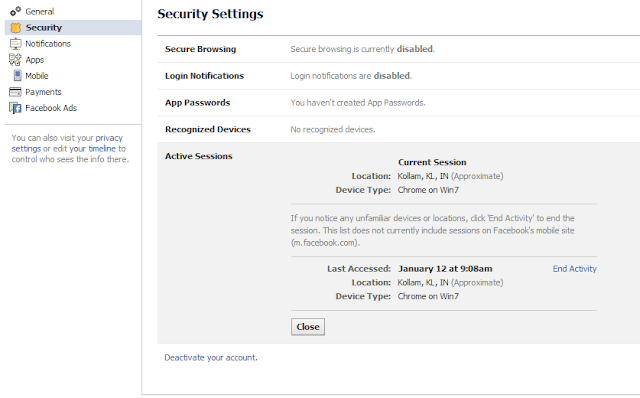
If a hacker managed to get into your account, they will leave a trace. While their session is active, it will be listed under > Home > Account Settings >Security > Active Sessions (click edit). Here you can end the activity of suspicious sessions.

.You will see something like this.
It is recommended that you enable Login Approvals for logging in from unrecognized devices. For increased security, you should also set app passwords.
1.1) Change Your Password
In case your password was not changed you got lucky! This is the time to update your password! Be sure to end any suspicious active sessions first (see above), then go to >Home > Account Settings > General and click > Password to confirm your current password and then enter a new password.
When you’re done, review our articles regarding Facebook security (see resources below) and see what other measures you can take to secure your account.
From here, proceed to step 3 if you think that your account was abused.
1.2) Reset Your Password
If your password was changed, act quick! Try to regain access. There is a > Forgot your password? link underneath the Facebook login.
It will let you retrieve your password in several different ways. You can either enter the email address you registered to Facebook with or any other secondary email address you added, as well as your phone number and username.
If you’re not sure whether the person that hacked your account was smart enough to change your profile information, you should go with the last option and enter your name and that of a friend. This will give you an idea of which information is currently added to your account.
If you don’t have access to any of the email accounts or to the phone number associated with your account, click the > No longer have access to these? URL. This will take you to a page where you can enter a new email address, which Facebook will then use to assist you in recovering your account.
2)Compromised Account
If your account wasn’t simply hacked, but is sending out ads and spam to your friends, you must report it as compromised.Click the link to go to the page.
3. Do Damage Control
After doing everything you could to regain control over your hacked Facebook account, inform your friends about what is going on, just in case the hacker has abused or currently is abusing your account. If you presently can’t access your account, contact your Facebook friends through other social networks, by email, or have a mutual friend inform them via Facebook. Once you can log in again, proceed to step 4.
4. Remove Suspicious Applications
Oftentimes, it’s not an evil person that randomly hacked into your account. More likely than not you granted access to a malicious application which subsequently hijacked your account. To remove suspicious applications, go to > Home > Account Settings > Apps and go through the list. Click the > X next to any application you wish to remove or click > Edit to change what the app can do.
Once you’re back in control, review the following resources and close the security gaps in your Facebook account.Hide all your personal contacts like email id,mobile number,etc So guys do you dare to mess with your facebook account?Go tight your security today itself.
Read More
0
 If you are interested in reading this article shows me that you are liking to be online for only limited friends in Facebook. Ya, even I like this feature of Facebook. If you don't wish to be online for all friends in Facebook then you can be online for at least certain friends in Facebook. You don't need to grant access to any application to use your profile data to access this feature. Its an integrated feature in Facebook but most of the people are unaware of this special feature. My friends will trouble me a lot during my working hours so I will use this feature to be online for certain friends. You can change this at anytime by publicly available to limited friends and vice versa.
Read More
How to be Online for Limited Friends In Facebook Chat
Follow this procedure to hide your Online status from certain friends:
1. Log In to your Facebook account.
2. In the left side bar in Facebook you will find the word lists hover the mouse over it you will get more option with it click on it.
3. After clicking a page will open showing you some lists and in above you will find an option of + Create List click on it.
4. Now you will be displayed with Create a list of people so you can easily share with them and see their updates in one place and in List Name: give your desired name like "My Close Friends", "My Buddies" etc whatever you like.
5. After choosing name you will be redirected to next page displaying Add friends to this list to see their updates. If you want to remove friends from the list later, click Manage List, above. Now you can add only the list of friends whom you wish to appear online.
6. Select the list of people whom you want to add to your list and then click as done.
7. Once you have done get back to your chat menu in the right bar of your Facebook account click on settings symbol and choose to Limit Availability... .
8. Once you click on it you will be shown two options
Make me unavailable to:
Only make me available to:
9. Now select the list of friends you want to be available to or unavailable to and select Okay.
10. That's it! Guys... Now your status will show online or offline to those list of selected friends only.
Its so simple and easy.
Trick to update your Facebook status in Blue color:
If you are really bored by updating your Facebook status in default black color and want to surprise your Facebook friends by updating your status in other color here is a new trick. Now by this trick you can update your Facebook status in blue color and surprise your friends.
Trick:
1. Copy and Paste the blue color word code in your Facebook status box
@@[1:[0:1: write any text]].
2. Now write or paste the text whatever you want and replace it with write any text.
3. Now update your status and see that your status will be appearing in blue color. Your friends will be fooled by seeing this. Now you can also fool your friends by updating this as Facebook status.
 4. You can also fool your friends by using this trick in comments also.
Trick to update your Facebook status in Blue color:
If you are really bored by updating your Facebook status in default black color and want to surprise your Facebook friends by updating your status in other color here is a new trick. Now by this trick you can update your Facebook status in blue color and surprise your friends.
Trick:
1. Copy and Paste the blue color word code in your Facebook status box
@@[1:[0:1: write any text]].
2. Now write or paste the text whatever you want and replace it with write any text.
3. Now update your status and see that your status will be appearing in blue color. Your friends will be fooled by seeing this. Now you can also fool your friends by updating this as Facebook status.
Read More
0
 Do you want to know "How to Tag friends in comments and posts you share in your stream and status in Google Plus and Facebook respectively". Its simple in Google Plus to tag your friends in a post. Even in Facebook tagging friends in post or in an comment is very easy. If you don't know I will explain it very easily and in a clear way. Even Twitter also supports the same option of tagging friends in tweets. Tagging helps your friend to know why you have recently mentioned him in your tweet or in your comment and it will notify him to check that your friend recently mentioned you in his tweet or status recently.
How to mention a friend in your tweet in Twitter:
Type '@' followed by your friend Twitter handler name in twitter. For example if you want to mention my name in twitter type my twitter handler name i.e, "@ArpithGJ" in your tweet and it will automatically notify me that you have been mentioned in a tweet by your friend in twitter.
How to mention a friend in your comments or status updates in Facebook:
While updating your status or commenting on a status or on page updates if you need to mention anyone then you need to add "@" followed by your friend's name in Facebook. It is similar to Twitter. For example if you need to mention me in Facebook you need to type @Arpith G J you will get a drop down menu displaying my name. Now you have to select my name and post a comment or update your status so that I will get notified.
How to mention a friend in your comments or in posts on your streams in Google Plus:
It is also similar to what you do in Facebook and Twitter. But, in Twitter and Facebook we will use "@" to mention others but whereas in Google Plus you will need to use "+" (plus) mark. For example, if you need to mention me in Google Plus you need to type +Arpith G J you will get a drop down menu displaying my name. Now you have to select my name and post a comment or a post on your stream so that I will get notified.
If you still feel any difficulty in mentioning or tagging others you can leave me a comment below.
Read More
How to Tag a friend in Google Plus, Facebook and Twitter
Do you want to know "How to Tag friends in comments and posts you share in your stream and status in Google Plus and Facebook respectively". Its simple in Google Plus to tag your friends in a post. Even in Facebook tagging friends in post or in an comment is very easy. If you don't know I will explain it very easily and in a clear way. Even Twitter also supports the same option of tagging friends in tweets. Tagging helps your friend to know why you have recently mentioned him in your tweet or in your comment and it will notify him to check that your friend recently mentioned you in his tweet or status recently.How to mention a friend in your tweet in Twitter:
Type '@' followed by your friend Twitter handler name in twitter. For example if you want to mention my name in twitter type my twitter handler name i.e, "@ArpithGJ" in your tweet and it will automatically notify me that you have been mentioned in a tweet by your friend in twitter.
How to mention a friend in your comments or status updates in Facebook:
While updating your status or commenting on a status or on page updates if you need to mention anyone then you need to add "@" followed by your friend's name in Facebook. It is similar to Twitter. For example if you need to mention me in Facebook you need to type @Arpith G J you will get a drop down menu displaying my name. Now you have to select my name and post a comment or update your status so that I will get notified.
How to mention a friend in your comments or in posts on your streams in Google Plus:
It is also similar to what you do in Facebook and Twitter. But, in Twitter and Facebook we will use "@" to mention others but whereas in Google Plus you will need to use "+" (plus) mark. For example, if you need to mention me in Google Plus you need to type +Arpith G J you will get a drop down menu displaying my name. Now you have to select my name and post a comment or a post on your stream so that I will get notified.
If you still feel any difficulty in mentioning or tagging others you can leave me a comment below.
Read More
