
1
Password Security Scanner is
a freeware and portable tool for Windows
which tells you if your passwords are strong and secure. This utility
scans the passwords stored by popular Windows applications (Microsoft
Outlook, Internet Explorer, Mozilla Firefox
etc) and displays security information about all these passwords. The
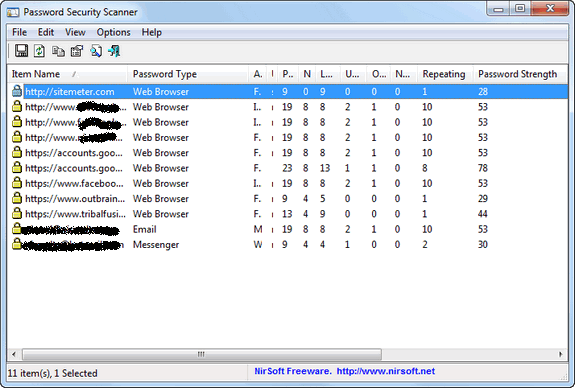
security information of every stored password includes the total number
of characters, number of numeric characters, number of
lowercase/uppercase characters, number of repeating characters, and
password strength.
You can use this tool to determine whether the passwords used by
other users are secured enough, without watching the passwords
themselves. For fetching certain passwords like dial up or VPN, the app
needs to be run in administrator mode.
Currently, the app scans the passwords of the following applications:
The app displays the complete details of the password without
actually displaying it and also shows a column “password strength”where
you can actually find if your passwords are strong enough.
Download Password Security Scanner


How to Check Your Password Strength
Password Security Scanner is
a freeware and portable tool for Windows
which tells you if your passwords are strong and secure. This utility
scans the passwords stored by popular Windows applications (Microsoft
Outlook, Internet Explorer, Mozilla Firefox
etc) and displays security information about all these passwords. The
security information of every stored password includes the total number
of characters, number of numeric characters, number of
lowercase/uppercase characters, number of repeating characters, and
password strength.
You can use this tool to determine whether the passwords used by
other users are secured enough, without watching the passwords
themselves. For fetching certain passwords like dial up or VPN, the app
needs to be run in administrator mode.
Currently, the app scans the passwords of the following applications:
- Internet Explorer 4.0 – 9.0
- Mozilla Firefox (All Versions)
- Dialup/VPN passwords of Windows
- MSN/Windows Messenger
- Microsoft Outlook
- Windows Live Mail
The app displays the complete details of the password without
actually displaying it and also shows a column “password strength”where
you can actually find if your passwords are strong enough.
Download Password Security Scanner
Subscribe To Get FREE Tutorials!

Subscribe to:
Post Comments (Atom)
Share your views...
1 Respones to "How to Check Your Password Strength"
Great bro !
Post a Comment