
1
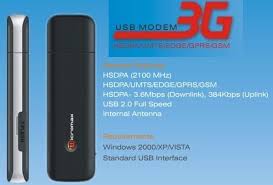 Just FOLLOW These STEPS:
1. plug ur modem to pc... now ur software will be opened automatically.
2. goto network select manual.
3. now select ur desired network and create a connection for ur network.
4. set it as default connection and exit.
5. now put the other sim for which u created connection.
6. plugin modem again and it will say invalid sim..dont worry ..just dont press ok, rather drag it to a corner.
7. now goto network connections under u can see the 3G Modem connection there.
just double click it and put dial up number *99#
and press dial...now u will be connected successfully...
 Tags:
bsnl hacks
Tags:
bsnl hacks

UNBLOCK BSNL 3G USB Modem and Use With Every sim
1. plug ur modem to pc... now ur software will be opened automatically.
2. goto network select manual.
3. now select ur desired network and create a connection for ur network.
4. set it as default connection and exit.
5. now put the other sim for which u created connection.
6. plugin modem again and it will say invalid sim..dont worry ..just dont press ok, rather drag it to a corner.
7. now goto network connections under u can see the 3G Modem connection there.
just double click it and put dial up number *99#
and press dial...now u will be connected successfully...
Subscribe To Get FREE Tutorials!
Tags:
bsnl hacks

Subscribe to:
Post Comments (Atom)
Share your views...
1 Respones to "UNBLOCK BSNL 3G USB Modem and Use With Every sim"
You can change registery and use all sim cards. Just open regedit from run command. Find bsnl3g, under this you can find engineer parameter and it value is 1. Just set the 0 value and click ok. Now, modem will be open for all network. Even you can see the network status and everything. You will have to create profile as per your network operator.
Post a Comment