
How to send larger than 25MB file attachments in Gmail
 Are you unable to send files more than 25MB in file attachments in your mail in Gmail?. Don't worry, now there is a trick to send files larger than 25MB files in Gmail. Before this trick I think you were depending on file hosting services like MegaUpload.com, Mediafire.com to transfer your large files on Internet. Now sharing files on internet has become easy. Now you can share very large files up to 1GB in email for free. You can share music, videos, movies, software, photo albums etc up to 1GB through email. Even in these modern days you still can't rely on those file hosting services to send your larger files on internet.
Google's email service provider i.e., Gmail and other email service providers are restricting their users by enabling a limitation to the users email accounts that an user can send a maximum of 25MB files in their emails. If you try to send a file larger than 25MB it will give you an error saying "The file exceeds 25MB attachment limit. Sorry".

There is a application called "Pando" which helps you in sending and sharing larger files via email. Its helps you in overcoming the defect of uploading larger files and helps you to maintain your privacy from the third party websites. Pando application supports the following operating systems Windows 7, Windows Vista, Windows XP, Mac O S X 10.4 or later. It is a free application as well as paid. In free service you can send up to 1GB file in email and if you upgrade to pro you can send up to 3GB.
Benefits of having Pro account:
- Share bigger files up to 3GB files.
- You won't be disturbed by their irritating advertisements.
- You can secure your files by adding passwords.
Steps to send larger files up to 3GB in file attachments in Gmail:
1. Download and install a free Pando application to your Windows and Mac operating system.[Link].
2. Run the Pando application and now select 'Share new' and select 'email'.
3. In 'to:' mention the recipient email address and now browse the files and folders you want to send to the recipient and fill out the 'Subject', 'Message' and 'From' (the sender's email ID).
4. Click on send to send your mail.
5. The application not only supports Gmail email service but it also supports the other famous email providers like Yahoo! mail, Hotmail and instant messaging services like AOL, Skype, Yahoo Messenger, Outlook and lots more.
6. For using this free service you don't need to register the account on their website.
Snapshot of uploading heavy files.

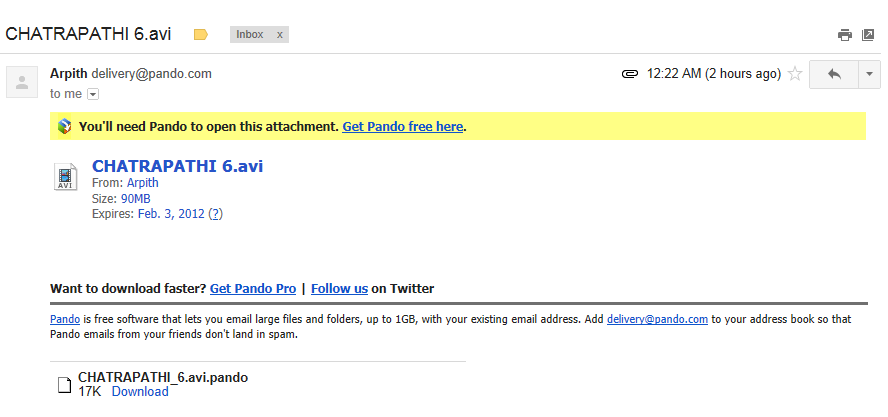
Snapshot of downloading heavy files.

To use the service even the recipient needs to install this application in his computer. You don't need to worry how to tell the recipient to install this application in his computer the software itself tells to the recipient in your sent email.
Share it with your friends and start sending emails with file attachments more than 25MB in Gmail.
 Read More
How to add Permanently delete option on right click in Computer
 I was searching for an alternate permanent delete option in my computer for "Shift+Delete". Basically in all Windows series operating systems "Shift+Delete" is the only option to permanently delete a file or folder. If you delete a file or a folder by selecting it and right clicking on it will get deleted but its called a temporary deletion and the folder or file deleted in this way can be restored again. You will find these files which are deleted using this option in recycle bin of your computer. Here is a software after installing it enables you to permanently delete a file or folder by right clicking on it.
This software is supported on operating systems like Windows 7, Windows Vista, Windows XP, Windows 2008, Windows 2000, Windows ME and Windows 98. However the software is worth of few dollars ($) but yet it is a freeware software and is free to use. And in my other post on windows 7 I explained you how to capture desktop screenshot. After installing this software permanent delete option on right click should appear in this way.

Click here to download the .rar file of Software to add Permanently delete option on right click on a file or folder in your Computer:
Download
Steps to follow to install permanently delete option on right click on a file or folder in your Computer:
1. Click on download option above and after downloading the software in compressed .rar archive extract the file using WinRAR.
2. After extracting the file open the folder you will find Sdelete.exe in it.
3. Now copy the Sdelete.exe file and paste it in C drive in the location C:\Windows\System32 then give administrator permission to install that software.
4. Now run anyone among the two registry files permanently delete on right click 1.reg or permanently delete on right click 2.reg and this completes your installation and for the first time you run that software you need to click on agree.
5. Now if you delete any file using permanently delete option on right click there is no chance to recover that file again.
If you didn't feel comfortable in using this option in your computer you can uninstall this software easily on your computer.
Steps to follow to uninstall permanently delete option on right click on a file or folder in your Computer:
1. In the extracted folder you will find Remove permanently delete on right click.reg file if you don't want this software to run on your system then run that .reg file.
2. After running that file you will be promoted with a message asking you to approve to merge that file.
3. You just approve it and once done your computer will be back to normal and now you won't find permanently delete option on right click.
If you feel any sort of difficulties in installing this software in your PC I am here to help you.You can ask me anytime.
Read More
How to Capture Desktop Screenshot on Windows 7?
 If it is your question: How to capture desktop screen or how to take a screenshot of your desktop in Windows 7? then you will get appropriate answer below.
- Free-Form Snip.
- Rectangular Snip.
- Window Snip.
- Full-Screen Snip.
- Hide instruction text.
- Always copy snips to the clipboard.
- Include URL below snips (HTML only).
- Prompt to save snips before exiting.
- Show screen overlay when Snipping Tool is active.
Selection
- Link color: Blue (Choose your convenient).
- [Tick] Show selection link after snips are captured.
- Press OK and save.
 Read More
Kaspersky Mobile Security 9 Activation Code Giveaway

- Android: 1.6-2.3
- BlackBerry: 4.5-6.0
- Nokia series 60 (S60): 9.1, 9.2, 9.3, 9.4
- Windows Mobile: 5.0-6.5

Kaspersky Mobile Security 9 costs $29.95 but I am giving it for free. Grab this opportunity and spread this to whole world.
Trust me I don't give you Keygen, Patch, Crack etc. I will give you the Activation code in a legal way.
Don't forget to leave your Email ID with both the steps followed.
Read More
Vlc media player changed its logo for christmas!!
All of us use VLC media player have u noticed this
I can't show this in a pic to make it interesting here is the video,
Happy Newyear and Merry Xmas!! Again
Read More
How to download torrents to your mobile directly even for s40 phones


All in the internet download movies, games etc,, by torrents.They like torrents as there are no parts.
But what did u think of downloading them on your mobile??
Here is the software.This is in jar format available for almost all jar phones http://gallery.mobile9.com/f/1854403/
checked on
Well as always if you use a s60 phone or more than that download symtorrent here :
Read More
How to download youtube videos without softwares
Hi to download youtube videos without softwares to download first u have to select a youtube video then check the url for example url:
now what u do is before youtube in www.youtube.com u make it
so a window pops up and u can download it
(or)
go to savevid.com and paste the url in the given box ex:
 then u click download as per the image down it will appear

Important: to download u need java plugin when u use morizilla or chrome it says automatically so from now on u can download youtube videos with out softwares bye :) see you
Read More
How to record computer screen while playing without camera
This is again written because when we record games with hyper cam there is a
great graphics problem so they created a new soft ware called fraps download
full version from here:
http://www.megaupload.com/?d=87G3F1DM this link is created by me :)
Read More
How to record computer screen without a webcam (hyper cam a gud screen recorder)
Easy Steps:
1.) Download here: http://www.shareup.com/HyperCam-download-18992.html(and dont worry, its a free download.)
2.) When downloaded, open it up and go to the license tab.
3.) When there, find the button that says "Enter License Code"
4.) Then copy and paste this code:
PD:{HyperCam 2}
LO:{Maria Pavon}
SN:{cb-5655824}
NC:{1}
LD:{2009.04.25}
KI:{HPHS-0}
FS:{1}
KD:{100
048 098 002 001 003 128 020 088
020 218 217 142 101 237 160 167
138 156 046 095 153 097 206 124
115 001 129 048 009 006 005 043
014 003 002 026 005 000 048 011
006 007 042 134 072 206 056 004
001 005 000 004 047 048 045 002
020 073 139 219 144 188 090 236
193 251 044 103 226 027 123 198
144 043 034 233 009 002 021 000
151 051 210 000 048 226 221 023
243 029 072 039 244 178 235 089
219 096 173 004
EK:}
5.) Select "Ok" and you are done!
Congradulations! You now have a working registered hypercam!
Thank u for the video through which i learnt how to download hypercam :http://www.youtube.com/watch?v=ZvFUd4BD8ds&feature=related
Read More
Real XBox 360 Fully Working Emulator - The Best XBox 360 Emulator Software For XP,Vista,W7

Include in this full package:
+ Beats of Rage Xbox 360
+ MAME360 For Retail Dash
+ MAME360
Support operating system:
+ Windows XP
+ Windows Vista
+ Windows 7
Read More
Real XBox 360 Fully Working Emulator - The Best XBox 360 Emulator Software For XP,Vista,W7
Include in this full package:
+ Beats of Rage Xbox 360
+ MAME360 For Retail Dash
+ MAME360
Support operating system:
+ Windows XP
+ Windows Vista
+ Windows 7
Read More
