
4

Many Bloggers , care about their traffic . From what you are getting traffic ? , through search engines and Social media's only.I notice some bloggers are only cared about the search results of their blog in Google , but not in other search engines.I too was like the same , when i was a newbie to blogging . But then i referred many blogs, and came to know that Google the search engine alone will not bring me traffic , but other search engines and social medias also. But when you notice that stats , page views to your blog is more in Google compared to other search engines. This is because you are only cared about the Google search results and not the other search engine's search results.Do you think that only Google has webmaster tools ? Bing and Yahoo too have .
The first I said about your search results in Google. If your blog's posts are not displayed on the Google between 1 to 4, then we can tell that Google hates your blog , without any protest .So we are Going to see , why Google hates your blog. There are four reasons why Google hates your blog.
You can read this article , how to use keyword in posts .
Hope you enjoyed this article! ,take 5 seconds to share this post if you found this post useful .
 Read More
4 Reasons why Google hates your blog
Many Bloggers , care about their traffic . From what you are getting traffic ? , through search engines and Social media's only.I notice some bloggers are only cared about the search results of their blog in Google , but not in other search engines.I too was like the same , when i was a newbie to blogging . But then i referred many blogs, and came to know that Google the search engine alone will not bring me traffic , but other search engines and social medias also. But when you notice that stats , page views to your blog is more in Google compared to other search engines. This is because you are only cared about the Google search results and not the other search engine's search results.Do you think that only Google has webmaster tools ? Bing and Yahoo too have .
The first I said about your search results in Google. If your blog's posts are not displayed on the Google between 1 to 4, then we can tell that Google hates your blog , without any protest .So we are Going to see , why Google hates your blog. There are four reasons why Google hates your blog.
- Your post's title doesn't start with a keyword
- Low quality Content
- No backlinks
- No comments
Your post's title doesn't start with a keyword
You can read this article , how to use keyword in posts .
Low Quality Content
Do you know that Google doesn't display the low quality posts in your blog ? , first ie.. before Google Panda started , Google indexed all the posts of all the blogs in the search engines. But when the Google Panda came , low quality contents of each and every site and blogs,are rejected or removed from Google search results. Many blogs had lose their traffic , caused by Google panda . Even Shoutmeloud and other popular sites. If you can't believe search your blog's post , which has less number of words , in Google . You can't see it , because it had been removed by Google! . My blog's some posts are also removed by Google , but then I rewrote the low quality articles and got published in Google search results . So if you have any low quality content in your blog , kindly remove it or rewrite the article with some more words.[ Minimum 250 words ].No Backlinks
The major part of your blog's traffic is based on the links from other sites to your blog.Do you know that Google page rank increases when your blog has more back links and Good or Quality posts?.But Google panda will not affect the Google page rank.It only reduces the traffic for your blog. First don't worry When your blog is affected from Google panda. Think why your blog is affected from panda . When you ask the bloggers this question , their first answer will be " Due to low quality content and few/no back links.More back links will also increase your alexa rank.How to get more back links from other blogs? , write guest posts, comment on popular blogs and much more....No comments
Getting comments from your readers are not easy .You have to work hard for it. There are several reasons , why your blog doesn't get comments , example , no Quality content, due to the comment box, low traffic, no info from the post. You already read above about quality content , so I no need to explain about it . Above I mentioned " no info from the posts " / That's the point . You should share some valuable information with your readers , then only the readers will comment on your post . The more comments , the more Google Likes your blog!.Hope you enjoyed this article! ,take 5 seconds to share this post if you found this post useful .
Read More
1
Page indexed in google
page indexed in bing
Backlinks
social options

Read More
Top 5 chrome plugins for developers
Hey guys
The most powerful browser we all use now is
The most powerful browser we all use now is
Chrome
So Why not use its extensions for your site and reduce time 
Here are 5 plugins which are really useful for every developer in this world.
Here are 5 plugins which are really useful for every developer in this world.
1)Adsense revenue checker plugin
It is a great plugin I use too.
there is a Stat button on the top of the chrome bar just you can click it for checking your revenue.

Download this plugin here
It is a great plugin I use too.
there is a Stat button on the top of the chrome bar just you can click it for checking your revenue.
Download this plugin here
2)Site alexa checker
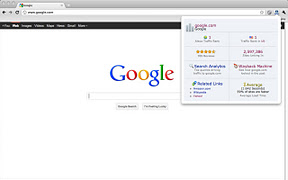
It is a very clean and fast plugin which shows you the alexa of any site by just visiting the site and clicking the “a” icon which will appear on the chrome bar.
here is a screenshot of the plugin :
Download the plugin here
It is a very clean and fast plugin which shows you the alexa of any site by just visiting the site and clicking the “a” icon which will appear on the chrome bar.
here is a screenshot of the plugin :
Download the plugin here
3)go.gl URL shortener
It is very useful and fast.
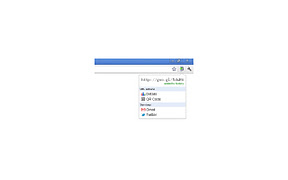
You can Shortern any url on the go by clicking the zip icon on the chrome bar.
here is a screen shot of the plugin
Download the plugin here
You can Shortern any url on the go by clicking the zip icon on the chrome bar.
here is a screen shot of the plugin
Download the plugin here
4)Google page rank checker
It is very fast as you need to put a captcha and do lot for checking PR of any site
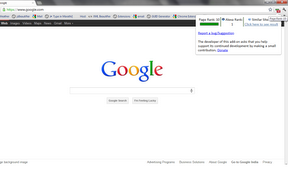
You must just click the icon and you will get your PR!
And the specialty is that you can see the alexa of that site too with this plugin
Here is a screenshot of the plugin
Download the plugin here
It is very fast as you need to put a captcha and do lot for checking PR of any site
You must just click the icon and you will get your PR!
And the specialty is that you can see the alexa of that site too with this plugin
Here is a screenshot of the plugin
Download the plugin here
5)All in seo for chrome
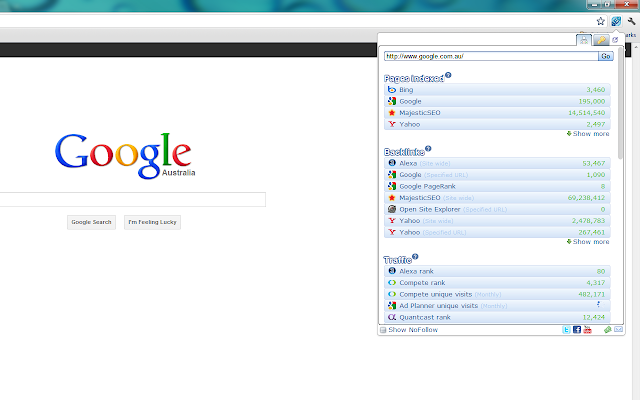
This is a must as most of the plugins listed above comes in this plugin itself for example it shows
This is a must as most of the plugins listed above comes in this plugin itself for example it shows
Here is the screen shot of the plugin
Download it here
So I hope you liked the post Please drop your comments and make us famous and happy
Read More
2
 Are you unable to send files more than 25MB in file attachments in your mail in Gmail?. Don't worry, now there is a trick to send files larger than 25MB files in Gmail. Before this trick I think you were depending on file hosting services like MegaUpload.com, Mediafire.com to transfer your large files on Internet. Now sharing files on internet has become easy. Now you can share very large files up to 1GB in email for free. You can share music, videos, movies, software, photo albums etc up to 1GB through email. Even in these modern days you still can't rely on those file hosting services to send your larger files on internet.
Google's email service provider i.e., Gmail and other email service providers are restricting their users by enabling a limitation to the users email accounts that an user can send a maximum of 25MB files in their emails. If you try to send a file larger than 25MB it will give you an error saying "The file exceeds 25MB attachment limit. Sorry".
 So, email users used to send larger files more than 25MB through torrents or by uploading on file hosting services servers and by sharing that URL with the recipient (to whom the file needs to be sent). Then the recipient needs to download those large files from the file hosting servers. The main drawback of using this service is that the sender needs to register with that file hosting service website. Otherwise the email sender used to cut these files into smaller partitions lesser than 25MB and send these files in multiple emails to the recipient. However it will cause problem to both sender and recipient because the sender needs to cut the file into multiple parts and the recipient needs to rejoin these multiple parts into a single file and use. It looks bit horrible but it can't be done by all. In these modern days you can't rely on that old process to send and share your larger files. Here are some steps used to skip verification process during the sign up of Google account. Now you can use this advanced method to send your large files and documents online in email and instant messaging.
There is a application called "Pando" which helps you in sending and sharing larger files via email. Its helps you in overcoming the defect of uploading larger files and helps you to maintain your privacy from the third party websites. Pando application supports the following operating systems Windows 7, Windows Vista, Windows XP, Mac O S X 10.4 or later. It is a free application as well as paid. In free service you can send up to 1GB file in email and if you upgrade to pro you can send up to 3GB.
Benefits of having Pro account:
Steps to send larger files up to 3GB in file attachments in Gmail:
1. Download and install a free Pando application to your Windows and Mac operating system.[Link].
2. Run the Pando application and now select 'Share new' and select 'email'.
3. In 'to:' mention the recipient email address and now browse the files and folders you want to send to the recipient and fill out the 'Subject', 'Message' and 'From' (the sender's email ID).
4. Click on send to send your mail.
5. The application not only supports Gmail email service but it also supports the other famous email providers like Yahoo! mail, Hotmail and instant messaging services like AOL, Skype, Yahoo Messenger, Outlook and lots more.
6. For using this free service you don't need to register the account on their website.
Snapshot of uploading heavy files.

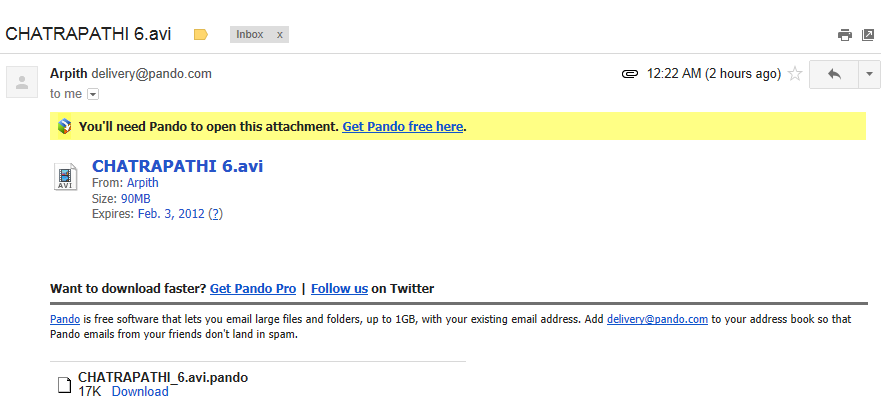
Snapshot of downloading heavy files.

To use the service even the recipient needs to install this application in his computer. You don't need to worry how to tell the recipient to install this application in his computer the software itself tells to the recipient in your sent email.
 [Click on the images to enlarge].
Share it with your friends and start sending emails with file attachments more than 25MB in Gmail.
Read More
How to send larger than 25MB file attachments in Gmail
Are you unable to send files more than 25MB in file attachments in your mail in Gmail?. Don't worry, now there is a trick to send files larger than 25MB files in Gmail. Before this trick I think you were depending on file hosting services like MegaUpload.com, Mediafire.com to transfer your large files on Internet. Now sharing files on internet has become easy. Now you can share very large files up to 1GB in email for free. You can share music, videos, movies, software, photo albums etc up to 1GB through email. Even in these modern days you still can't rely on those file hosting services to send your larger files on internet.Google's email service provider i.e., Gmail and other email service providers are restricting their users by enabling a limitation to the users email accounts that an user can send a maximum of 25MB files in their emails. If you try to send a file larger than 25MB it will give you an error saying "The file exceeds 25MB attachment limit. Sorry".

There is a application called "Pando" which helps you in sending and sharing larger files via email. Its helps you in overcoming the defect of uploading larger files and helps you to maintain your privacy from the third party websites. Pando application supports the following operating systems Windows 7, Windows Vista, Windows XP, Mac O S X 10.4 or later. It is a free application as well as paid. In free service you can send up to 1GB file in email and if you upgrade to pro you can send up to 3GB.
Benefits of having Pro account:
- Share bigger files up to 3GB files.
- You won't be disturbed by their irritating advertisements.
- You can secure your files by adding passwords.
Steps to send larger files up to 3GB in file attachments in Gmail:
1. Download and install a free Pando application to your Windows and Mac operating system.[Link].
2. Run the Pando application and now select 'Share new' and select 'email'.
3. In 'to:' mention the recipient email address and now browse the files and folders you want to send to the recipient and fill out the 'Subject', 'Message' and 'From' (the sender's email ID).
4. Click on send to send your mail.
5. The application not only supports Gmail email service but it also supports the other famous email providers like Yahoo! mail, Hotmail and instant messaging services like AOL, Skype, Yahoo Messenger, Outlook and lots more.
6. For using this free service you don't need to register the account on their website.
Snapshot of uploading heavy files.

Snapshot of downloading heavy files.

To use the service even the recipient needs to install this application in his computer. You don't need to worry how to tell the recipient to install this application in his computer the software itself tells to the recipient in your sent email.
Share it with your friends and start sending emails with file attachments more than 25MB in Gmail.
Read More
0
 Hi, friends today i'm gonna say how to change the theme of Google.Most of the people
hate the original theme of Google so I'm gonna say you this trick.Installing these
themes are very easy.
How To Install This?
I tried this with google chrome. userstyles.org have themes for facebook, youtube..., Same should be done for that also.
Do you think this is interesting?Have doubts?
If you have doubts comment on my post.
Read More
How to change the theme of google
hate the original theme of Google so I'm gonna say you this trick.Installing these
themes are very easy.
How To Install This?
- Go to Chrome webstore and in the search bar type 'Stylish'.Choose 'Stylish' which is created by 'Jason Barnabe'.
- Click 'ADD TO CHROME' button.Then it will ask for installation and install it.Installation takes just few minutes.
- Now there will be a icon written 'S' at the top, right.It will be right of the URL bar.
- Now go to Userstyles ,clich on that 'Google themes'.
- Then there will be a list of themes, select the theme which you want and click that.
- When click that a page will open. Now click the button 'Install with Stylish'.
- Now it will be installed.If you visit google now it will the theme which you liked.
- If you want to change the theme select another theme from Userstyles and install it.
- Then go to google left click that icon ,click disable at the old theme.If you don't that two will be enabled if you don't disable the other except what you want that will be collapsed.
I tried this with google chrome. userstyles.org have themes for facebook, youtube..., Same should be done for that also.
Do you think this is interesting?Have doubts?
If you have doubts comment on my post.
Read More
2
If you are searching for "How to escape from Google's verification process while creating Google account?" then here I have a better trick. I think you all will be thinking that I am going to tell you the same processes which you will find in Google by Googling various blogs. No, I won't tell you to delete all your browser cookies and cache while creating a new Google account. I don't even tell you that use some proxies while creating Google account and all that things which have no concern at all to this topic. Google is called as the King of Internet can you think that we people can fool Google by following these simple steps.
Steps to skip Google's verification process while creating Google account:
1. Millions of people Sign Up to Google's products everyday like AdSense, Analytics, Blogger, Docs, FeedBurner, Google+, Google Friend Connect, Google URL Shortener, Groups, iGoogle, Picasa Web Albums, Webmaster Tools, YouTube, Gmail, AdWords, Alerts, Orkut, Google Plus etc.
2. The above listed are only the major products of Google. You can have main account on Google called as Google account. Once you create a Google account you will get access to all those above listed Google products for free.
3. To create a single Google account you need to verify to Google that "Who you are?".
4. I have four accounts in Google and I can't verify all those accounts by giving every account a different phone no. and verifying them by SMS verification or Automated call verification.
5. So, I thought to find a loop hole of how to create a Google account without verifying and ultimately succeeded in it.
6. Now, while creating your new Google account you need to enter your First Name and Last Name now search for any unique name not like "Arpith" or "George" etc. try to enter anything unique like "MrPerfectArpith" and anything later you can change to your original name once the account is created successfully.
7. Now you will be shown Log In or Username let it be difficult to remember but maintain uniqueness. Try anything which you think no one has yet chosen that username within first two attempts only.
8. Now enter the strong password with the combination of both letters and numbers.
9. Now choose the security question. I recommend you to write your own security question while creating account later you can change.
10. You just understand that your whole account profile should be unique.
11. Now Sign Up with Google.
12. If you didn't just enter the same names again and again Google while take a look at its database and track your Internet IP, Geo location and will redirect you to page to get your account verified by automated bots like SMS verification, Automated call verification.
13. I recommend you to enter everything in an unique style during the time of account creation and later you can change everything whatever you want.
Enjoy guys!! Start skipping the verification steps during Google account creation and create unlimited Google accounts.
Read More
Skip verification process while creating Google account
If you are searching for "How to escape from Google's verification process while creating Google account?" then here I have a better trick. I think you all will be thinking that I am going to tell you the same processes which you will find in Google by Googling various blogs. No, I won't tell you to delete all your browser cookies and cache while creating a new Google account. I don't even tell you that use some proxies while creating Google account and all that things which have no concern at all to this topic. Google is called as the King of Internet can you think that we people can fool Google by following these simple steps.Steps to skip Google's verification process while creating Google account:
1. Millions of people Sign Up to Google's products everyday like AdSense, Analytics, Blogger, Docs, FeedBurner, Google+, Google Friend Connect, Google URL Shortener, Groups, iGoogle, Picasa Web Albums, Webmaster Tools, YouTube, Gmail, AdWords, Alerts, Orkut, Google Plus etc.
2. The above listed are only the major products of Google. You can have main account on Google called as Google account. Once you create a Google account you will get access to all those above listed Google products for free.
3. To create a single Google account you need to verify to Google that "Who you are?".
4. I have four accounts in Google and I can't verify all those accounts by giving every account a different phone no. and verifying them by SMS verification or Automated call verification.
5. So, I thought to find a loop hole of how to create a Google account without verifying and ultimately succeeded in it.
6. Now, while creating your new Google account you need to enter your First Name and Last Name now search for any unique name not like "Arpith" or "George" etc. try to enter anything unique like "MrPerfectArpith" and anything later you can change to your original name once the account is created successfully.
7. Now you will be shown Log In or Username let it be difficult to remember but maintain uniqueness. Try anything which you think no one has yet chosen that username within first two attempts only.
8. Now enter the strong password with the combination of both letters and numbers.
9. Now choose the security question. I recommend you to write your own security question while creating account later you can change.
10. You just understand that your whole account profile should be unique.
11. Now Sign Up with Google.
12. If you didn't just enter the same names again and again Google while take a look at its database and track your Internet IP, Geo location and will redirect you to page to get your account verified by automated bots like SMS verification, Automated call verification.
13. I recommend you to enter everything in an unique style during the time of account creation and later you can change everything whatever you want.
Enjoy guys!! Start skipping the verification steps during Google account creation and create unlimited Google accounts.
Read More
0
So here is the video
Happy new year!!!!!!
Read More
How to delete all mails in gmail at a time
Hey guys
I found that due to some spamming or leaving the mail undisturbed may cause you to delete more than 3000 mails which is boring!!!!!
So here is the trick how to delete all the mails at a time
First go to your inbox and select all mails
then you will get an option select all mails in your inbox then give delete
Patience is needed! :P
As I already deleted 5032 mails from my inbox I can't show you pics
So here is a video by some other person
I found that due to some spamming or leaving the mail undisturbed may cause you to delete more than 3000 mails which is boring!!!!!
So here is the trick how to delete all the mails at a time
First go to your inbox and select all mails
then you will get an option select all mails in your inbox then give delete
Patience is needed! :P
As I already deleted 5032 mails from my inbox I can't show you pics
So here is a video by some other person
So here is the video
Happy new year!!!!!!
Read More
0
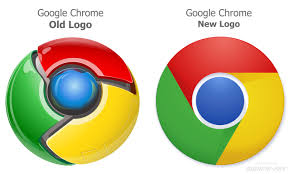 Hi friends, have you seen a change in the logo of Google Chrome some of them may not been noticed this including me.I found the change in its logo after 5 days after the change because I had no time look for it minutely.Do you all like this logo?I don't like this.
But it's said that a simpler icon embodies the chrome spirit--to make the web lighter, quicker and easier.This is said by Steve Rura a Google designer.I say that Chrome 10 is mighty faster but the logo's doesn't fit the browser.
Do you like the new logo?
Read More
Google Chrome's new logo
But it's said that a simpler icon embodies the chrome spirit--to make the web lighter, quicker and easier.This is said by Steve Rura a Google designer.I say that Chrome 10 is mighty faster but the logo's doesn't fit the browser.
Do you like the new logo?
Read More
0
 Hi Friends today i'm gonna say you how to create pages in Google + for the development of your blogs or websites in social media sites.Creating pages is very important because your fans will not visit your site often and they won't know the latest updates from your site.So if you create pages and if you share it on the pages, they will know the updates and they will visit your site.For example,I won't visit my friends site Geekspot but I know the latest updates of his site since he will share in facebook in my wall whenever he writes any post.
How to Create
Sign in your Google + account and watch for Create a Google+ page in your home page.Actually this one lies at the right side of your homepage,click on it.After you click this,it will ask for a category.Choose a category and have fun with it.
How do I Build it after
Just look near your Avatar or Profile Photo, there is a drop down, just click that it will show your pages and click any of that which you want to build.
Read More
How to create Pages in Google + for Blogs and Websites
How to Create
Sign in your Google + account and watch for Create a Google+ page in your home page.Actually this one lies at the right side of your homepage,click on it.After you click this,it will ask for a category.Choose a category and have fun with it.
How do I Build it after
Just look near your Avatar or Profile Photo, there is a drop down, just click that it will show your pages and click any of that which you want to build.
Read More
0
Read More
Google doodle of 2011 for christmas and holidays!!
hey guys
Lot of posts due to christmas
Here is the google doodle which is released today :)
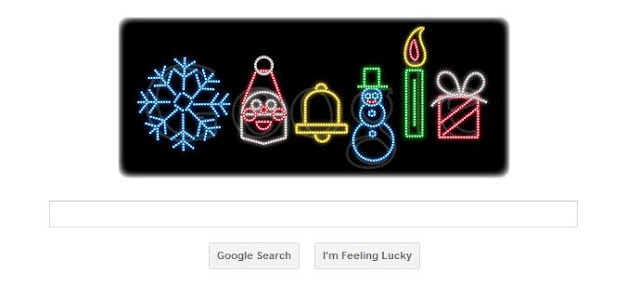
Ok guys happy christmas and happy new year 2012
Thanks for all the views you made this day!
Lot of posts due to christmas
Here is the google doodle which is released today :)

Ok guys happy christmas and happy new year 2012
Thanks for all the views you made this day!
Read More
1
Read More
Google like Youtube let it snow
Hey guys
All are doing something for christmas huh??
Did u see this Youtube has done it too :)
 So here is how you apply Let it snow on youtube
Click the snow flake.
and you may see this

All are doing something for christmas huh??
Did u see this Youtube has done it too :)
Click the snow flake.
and you may see this

Ok now enjoy let it snow for youtube too!!!!!
Happy christmas
Read More
0
 When I was searching for google's new project new project, I saw a new project Google's Art Project. I just went into http://www.googleartproject.com/ in which great pictures of the art in different museum.It is cool and amazing. You should also visit this.
Read More
Google's art project
When I was searching for google's new project new project, I saw a new project Google's Art Project. I just went into http://www.googleartproject.com/ in which great pictures of the art in different museum.It is cool and amazing. You should also visit this.
Read More
6
Read More
One of google's greatest achievement we didn't see
hey guys
Google is a very popular or the search engine nowadays
I was reading history of google when I saw this
Google started a project called "metaplex"
http://www.google.com/onceuponatime/mentalplex/
for April fool's day 2000
Most of us (I mean like me ) Didn't see it
Go here and take a look at this

Try this
Comment if it worked for u it said I shaked my head :)
Happy googling, newyear
Google is a very popular or the search engine nowadays
I was reading history of google when I saw this
Google started a project called "metaplex"
http://www.google.com/onceuponatime/mentalplex/
for April fool's day 2000
Most of us (I mean like me ) Didn't see it
Go here and take a look at this

Try this
Comment if it worked for u it said I shaked my head :)
Happy googling, newyear
Read More
4
Happy new year and Merry chrismas
Read More
Google introduces Let it snow effect for this christmas
Hey everyone
First of all Wish you all a merry Xmas and a happy new year
Here is a video I wanna show u this video:
First of all Wish you all a merry Xmas and a happy new year
Here is a video I wanna show u this video:
Happy new year and Merry chrismas
Read More
0
 Google is tweaking every part of their services by introducing new changes for its users to make it more productive and easy to use. Earlier it introduced blogger's new interface,then New Gmail interface,recently a new look in Youtube and now Google announced that the old Google homepage will be replaced by a new dropdown menu at the left side of the page. Well, this step is taken for its users only as users are bored with the old Google homepage. Secondly, now you can access various tools right from the side of your Google Homepage more efficiently. Thirdly, It is also a step to compete with other famous sites like Facebook,Twitter,etc. If you don't know, how will be the new look,then checkout the image below.

Read More
Trick to Get New Google Sidebar

Well, these tools at the sidebar seems to be pretty nice and useful too. Well, Google is busy rolling out this change but it will be soon be released for all users. But you might be too curious to Get New Google Sidebar right now, So I brought a trick for it.
Trick to Get New Google Sidebar:
For Google Chrome:


- In chrome browser, firstly you need to install Cookie Editing Extension!!
- After installing,Go to www.google.com and make a right click anywhere on the page and then select Edit Cookies.
- Now a dialog box will appear. Navigate to PREF and Replace the value field by below code:
ID=03fd476a699d6487:U=88e8716486ff1e5d:FF=0:LD=en:CR=2:TM=1322688084:LM=1322688085:S=McEsyvcXKMiVfGds
- Now Click on Submit Cookie Changes button present at the bottom of the page.
- Now Refresh www.google.com page and you will see a new Google Sidebar.
For Mozilla Firefox:
- Firstly open Mozilla Firefox browser, and install this Cookies Manage+ Add-on!!!
- Now open www.google.com in your browser and click on Tools button and Select Cookies Manager+ from the dropdown menu.

- Now you need to replace the value given in content field by the below one:
- Click on Save Button and Close.
- Refresh www.google.com and you will Get New Google Sidebar!!!
So, You get the New Google Sidebar before its Official Release!!!
Kindly share your views via comments on Trick to Get new Google Sidebar!!
Kindly share your views via comments on Trick to Get new Google Sidebar!!
Read More
